Bullfrog Productions, 1995 · Updated 26 October 2026
Magic Carpet 2 on a modern PC: 4K, smooth frame rates and fixes
Short answer: play it with Magic Carpet 2 HD, a free open source rebuild for modern Windows, using your own copy of the game.
Then add the free RenacidaMods edition for smooth frame rates: 60 to 95 fps at 4K instead of 24, with the game still running at its normal speed.
Results
Measured 25 to 26 October 2026 on an RTX 3090, Ryzen 9 5950X and 42" LG C3 (120 Hz), Windows.
| Version | 3840 x 2160 | 1920 x 1080 | Game speed |
|---|---|---|---|
| Magic Carpet 2 HD 0.9.16.0, default settings | 24 fps | 24 fps | Normal |
| Magic Carpet 2 HD with maxGameFps raised | Higher | Higher | Too fast: the whole game speeds up |
| With the RenacidaMods edition | 60 to 95 fps | 120 fps | Normal |
| RenacidaMods edition 0.2 as shipped (automatic settings, 6 render threads) | About 70 fps | – | Normal |
The display mode alone makes a big difference at 4K: Direct3D 11 shows a frame in about 5.5 ms, against about 11 ms for the Direct3D 9 mode used by default (roughly 48 fps going up to 90 fps in the same scene).
What the RenacidaMods edition changes
- Smooth frames: the game still runs its normal 24 steps a second, with extra frames drawn in between, up to 120 a second.
- Smooth creatures and spells: fireballs and creatures glide between steps too.
- Snappier steering: the view follows your carpet a whole game step sooner.
- Round sprites: mana balls, creatures and trees at their intended shape. They were about 20% too wide, because the art was drawn for DOS's tall pixels.
- Faster display on Windows: Direct3D 11 instead of Direct3D 9.
- Sets itself up: draws at your screen's resolution (4K on a 4K screen) and picks how many processor cores to draw with (one fewer than you have, up to 6). New in 0.2.
- Creatures easy to spot on the maps: their marks are 3 times bigger on the large map and 2 times on the minimap. On a 4K screen they were only 2 to 4 pixels across. New in 0.2.
- A crash fix for help labels at high resolutions, and the game no longer grabs your mouse when its window isn't active. The window's close button quits straight away; Alt+F4 is left to the game, where it's a cheat key.
--load_save lateststarts straight back into your newest in-level save.
Every change, and how it works, is written up on GitHub: RenacidaMods changes for Magic Carpet 2. The code is open source, so anyone is welcome to adopt any of it.
Round sprites: before and after
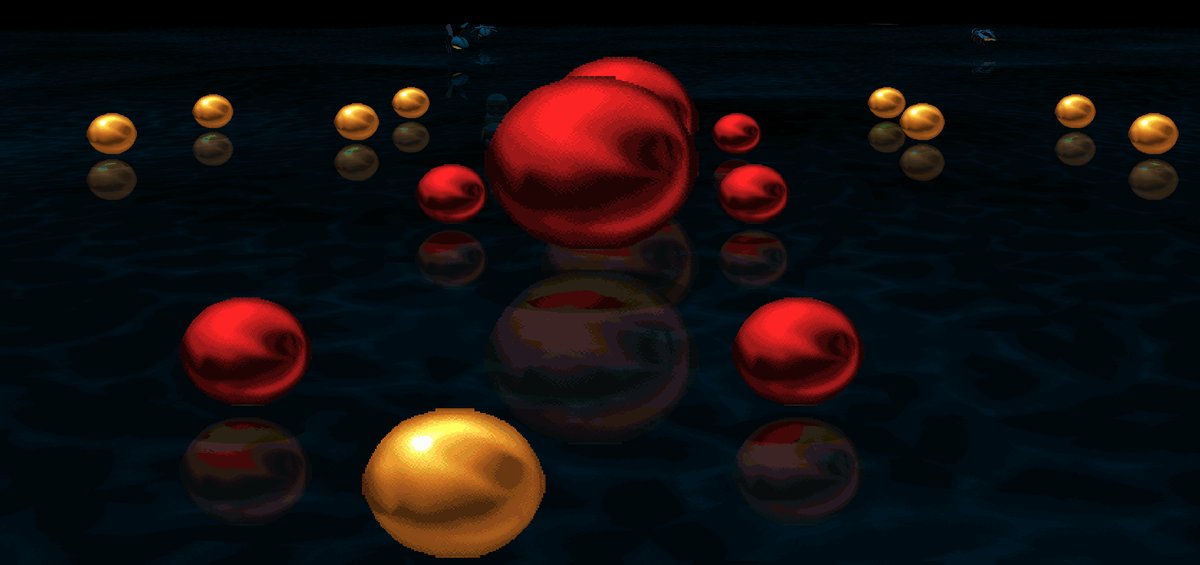
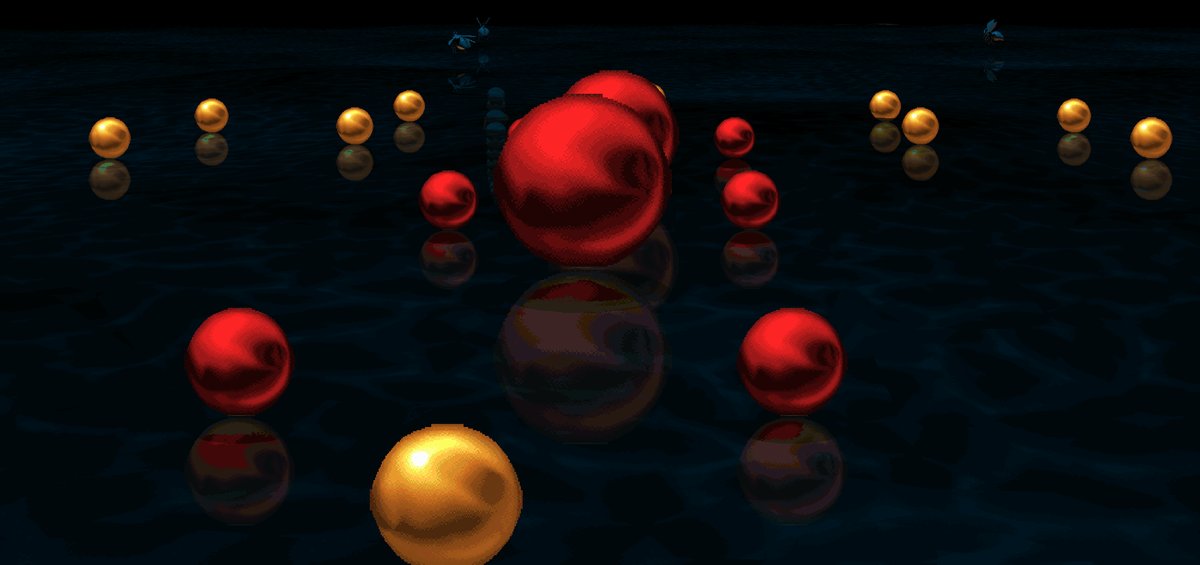
Same level, spot and camera, captured at 3840 x 2160 on 26 October 2026 and cropped. Both from the RenacidaMods build with only the sprite fix switched off or on; with it off, sprites are drawn exactly as in Magic Carpet 2 HD 0.9.16.0.
How to install
- Install Magic Carpet 2 HD 0.9.16.0 as its own guide describes, and check it runs.
- Back up your
config.json, then copy everything from RenacidaMods-MC2HD-0.2.zip into your Magic Carpet 2 HD folder, replacing the files already there. - Start
remc2.exe. It draws at your screen's resolution. If it isn't smooth, set a lower one inconfig.json(gameResWidthandgameResHeight).
Updating from 0.1? Do the same, then copy any settings you'd changed into the new config.json. To undo it, put back the files from the Magic Carpet 2 HD download and your saved config.json.
What PC do you need?
The processor matters most, because Magic Carpet 2 HD draws its 3D world on the CPU. Any graphics card that supports Direct3D 11 should cope. If it isn't smooth, lower the resolution or the renderFps setting.
So far it's only been tested on the PC above. Reports from other PCs are very welcome on GitHub.
Questions
What's the best way to play Magic Carpet 2 on a modern PC?
Use Magic Carpet 2 HD with the game data from your own copy of Magic Carpet 2. For smooth frame rates at 4K at the normal game speed, add the RenacidaMods edition: 60 to 95 fps at 3840 x 2160 instead of 24.
Does Magic Carpet 2 run at 4K?
Yes, with Magic Carpet 2 HD, which runs at any resolution including 3840 x 2160. Out of the box it draws 24 frames a second; the RenacidaMods add-on raises that to 60 to 95 fps at 4K on a fast CPU.
Why is it stuck at 24 fps, and can I raise it?
The game's speed is tied to its frame rate: it runs 24 game steps a second. Raising maxGameFps makes the whole game faster, not smoother. The RenacidaMods edition keeps 24 steps a second and draws extra frames in between.
Is Magic Carpet 2 HD widescreen?
It fills a 16:9 screen with square pixels and no stretching. Compared with 4:3, the 16:9 view is zoomed in by about 22% rather than showing more at the sides.
Why do mana balls and creatures look too wide?
The art was drawn for DOS screens at 320 x 200 on a 4:3 monitor, where pixels were 20% taller than wide. On square pixels the sprites come out about 20% too wide. The RenacidaMods edition draws them at their intended shape.
Does it include the game?
No. Neither Magic Carpet 2 HD nor the RenacidaMods add-on includes game files. You need your own copy of Magic Carpet 2, such as the GOG version or the original CD.
Is it free?
Yes. Both are free software under the GNU GPL version 3. The add-on's source code is in the renacida-mods branch.
Coming next
Plans, not promises.
- Even snappier steering, using the live mouse position for the in-between frames.
- Campaign progress kept after a
--load_savestart.
Credits
Magic Carpet 2 HD is the work of Tim Hobbs (thobbsinteractive), Tomáš Veselý (turican0) and their contributors. Tomáš's years of reverse engineering the original game made all of this possible. RenacidaMods only builds on top of it.
Magic Carpet 2: The Netherworlds was made by Bullfrog Productions and published by Electronic Arts.